Audition rejected - levels too low

Hi folks!
I'm new to Voice Bunny and trying to get dialed in to the technical requirements of the deliverables. I recently submitted the Bunny audition read. The specs said to keep the peaks below -3 db, and so I lowered the levels quite a bit to get there. Then, when I submitted, I got an immediate rejection saying the levels were too low.
Now in hindsight, I think where the problem might have occurred was in the meter I was using. I come from a video production background, so I used Avid (video editing software) to record and edit the audio. Below is a screenshot of the meters I was using. I was keeping levels at -3db on the VU meter on the right, but I'm wondering if I should have been going for -3db on the left?
It's easy enough to boost the levels, but since that also boosts the noise floor, I was wondering if someone could give a listen to my files and share their opinion whether the boosted audio would be acceptable?
Thanks so much in advance.
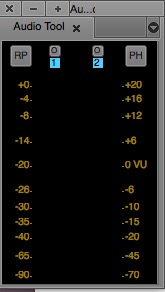
This is the audio file that was rejected for levels being too low:
https://dl.dropboxusercontent.com/u/41025138/Bunny%20audition-levels%20too%20low.wav
This is the audio file with boosted levels. Would this be acceptable? (I added in handles at the both ends to make it easier to evaluate any room tone.)
https://dl.dropboxusercontent.com/u/41025138/Bunny%20audition-levels%20boosted.wav
Please sign in to leave a comment.
Hmm. I'm another VB talent (not offical), but here are my thoughts.
I downloaded your samples and checked them. The "too low" sample peaks at -3.78db. Close, but not close enough. The boosted sample is actually quieter. It peaked at -18.26db.
What DAW do you use to record your audio? I use Adobe Audition (which is very similar to the free Audacity). When I record, I usually don't watch the meter, except to see if I'm hitting the red (getting too loud) for some reason. Then I edit my read. Normally, it's coming in between -18 db and -6 db. When I finish editing, I choose the Favorites menu option and pick the "Normalize to -3db". This will adjust the volume of the entire audio clip so that it's peaks at -3db. Other DAWs certainly have a similar normalization feature.
This doesn't mean that the entire clip is coming in at the same volume. I still have inflections, soft and loud parts, but the overall volume is raised. This is a general industry standard, because it leaves some room for the client's engineers to make adjustments when they add processing (if needed).
Note: When looking at my wave form, prior to normalization, there may be one or two spots that spike, or are extra loud. I usually manually adjust those to be a bit closer to the rest of the wave, without compromising the read of course. This allows the normalization process to be more effective.
VoiceBunny doesn't want us to do other processing, Compression, EQ, etc, but applying normalization is expected.
Let me know if you have other questions :) -- cat
Thanks so much, Cat! I didn't know we were expected to normalize audio.
I'm using Twisted Wave, but still learning it. Should the audio meter be set to RMS or LUFS, and what's the difference?
Is the number at the bottom of the audio meter the noise floor? What's the sweet spot for that? (obviously as low as possible, but what's acceptable?)
Alas, I don't speak Twisted Wave :( I did find this video, however: https://vimeo.com/141347208 Go head and do -3db for VB (not -1db as he recommends).
During my recording session, I'm more concerned with relative levels (watching for abherent peaks or dips) than absolute levels, so the scale is not a big concern. Then, in post, I normalize to -3, and I get what I want.
As for the difference between RMS and LUFS,my best guess is that it's like the difference between Farenheit and Centigrade. But don't take my word for it, because I really don't know. I did scan this article which may answer your question better (looks like it links to some great resources): https://www.reddit.com/r/edmproduction/comments/2c5j3v/lufs_vs_rms/
If you want to dig deep into this stuff, I'd recommend reaching out to folks like Tim Tippets or George Whittam for in depth lessons on how it all fits together!
Hi, Cat and Mike.
Thanks for sharing with us your audio and comments.
I completely agree with Cat. The file you say that sounds louder actually sounds softer than the other. Perhaps they are the other way around and you uploaded to VB this file https://dl.dropboxusercontent.com/u/41025138/Bunny%20audition-levels%20boosted.wav ?
If you look at the sound player in VB, you can easily see that the sound wave is too small, which means that the volume of the audio file is too low. This is the sound file for your application: https://voicebunny.com/shared/view/ODk4Mjkx
When recording it's very important to leave a decent range of head room to avoid any clipping (analog and digital). For voice overs (obviously depending on the play, if you have to scream or shout then you need to take that into account) but usually recording at -6dB dbfs (full scale, which means where 0 is clipping) Peak is a good point to have enough room above but also to leave the noise floor well below. After recording, you can then Normalize at -3dB dbfs Peak. RMS is the average, which is a different measurement, so make sure you select Peak.
Both measures are very useful. For example: if you select -3db Peak, then the processor will make sure that the loudest peak of audio is at -3dB. However, some parts of the audio can still be super soft because it will maintain the balance.
If you select RMS, then the processor will raise the volume so in AVG the volume is at -3dB peak. That means that some parts will be super loud and probably distort, and other will be below -3dB.
I hope you find this short explanation useful!
Kind regards,
Juan