ArticleBunny: Quality Control Overview

A few weeks ago, we hosted a webinar where we explained how our quality control process works for ArticleBunny. As ArticleBunny’s process is slightly different, we decided to host a full webinar dedicated to how the process works and give special tips to all our writers. Our ArticleBunny quality control manager, Lisa Logan, was a co-host and explained the general aspects of the process.
Want to know more about it? Take a look at the video we have of the presentation here or keep reading this post.
Introduction
Lisa Logan has always been passionate about languages, grammar, and writing which led her to study Spanish and French. She has her own blog and has a vast experience in writing as well. She joined the Bunny Inc. sales team in March 2015 and moved to the ArticleBunny quality control team in January this year.
How does Quality Control work?
Our quality control process works as follows:
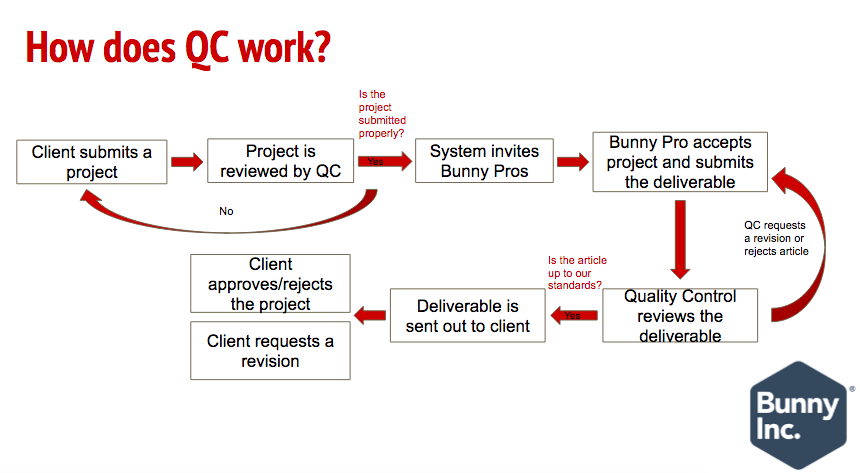
Keep in mind that not every project submitted by the client is reviewed manually. Only the first project from a first-time client is actually passed through quality control. We take this opportunity to make sure the projects are properly submitted and to teach our clients how to provide appropriate remarks. In the rest of the cases, our algorithm approves it automatically and removes any personal information like phone numbers or email addresses that violate our privacy policies.
Just like with VoiceBunny, when we review the projects, we pay a lot of attention to the brief (the part that goes above the remarks), remarks, and attachments. We make sure that all the necessary resources (blog posts, references, etc.) are included and that the instructions are clear. If we find something that is not accurate, we reject the project and our production management and sales teams help us gather all the missing information to assure a good project is submitted.
When we review the articles, we make sure that the piece follows both the brief and the remarks. We need to make sure that the article is using the correct voice, tone, and structure and that it matches the word count requested by the client. At the same time, we check that there are no grammar or spelling mistakes before we move forward to perform a plagiarism check. Keep in mind that we also review the content as well to make sure it addresses the topic appropriately and that the sentences go straight to the point (a.k.a no 'fluff'). This helps to ensure the article is top notch.
After all these checks have been performed, we proceed to either approving, requesting a revision or rejecting the article depending on the deadline of the project, its requirements and how good the piece is.
Expectations
Currently, we have one person in the quality control area. Lisa is available Monday through Friday, from 8 am - 6 pm (Central Standard Time). Keep in mind that every article that is submitted after this time, will be reviewed the next day and, therefore, the longest you’ll be waiting for an article to be checked is 14 hours. If more than that time has passed and you have not gotten a response, please let us know!
As the volume of projects increases, we’ll be able to hire another person so we’re working hard with our Sales team to make sure we can get another person very soon.
Tips
- Use Grammarly! Grammarly is an application for your browser that will help you check the coherence and grammar of the pieces you’re writing. We use Grammarly Premium, but they also have a free version which is very useful. This tool will help you point out issues such as spelling mistakes, missing commas, tenses, etc. which are some of the most common mistakes we’ve pinpointed in the articles submitted to our website. We highly recommend that you use it when writing your each and every one of your articles.
- Check your article on Hemingway App. Hemingway App is a free tool that helps you check how your articles are written. It’ll highlight sentences using passive voice, complex and dense sentences, adverbs, and will even give you suggestions in places where another word choice would be better. As well as Grammarly, we always review the articles with Hemingway App so we highly recommend you use it before submitting articles to us.
- Write in a separate editing program and then copy and paste it into our editor. We recommend using a separate program to write the pieces to help you make sure you always have a copy of a piece you submit to us. Also, as with any platform out there, our system may fail and the pieces can get lost. As we don’t want that, we highly recommend you to use separate editors such as Google Docs, Word, Pages, Open Office, etc., save a copy and make sure the format is the same when you paste it into our editor.
- Always give your articles that ONE LAST proofread. As humans, we’re not perfect. We can make mistakes and not even notice them until the end. When we proofread our pieces (let it be articles, emails, etc.) before sending them, we can make sure that the article is just as we envisioned. Remember that these articles will go to real clients who will use them in their own blogs, magazines, knowledge bases, etc. so making sure it works for their specific needs is really important.
Please sign in to leave a comment.
.