Urgent Bunny Pro notice: Recording quality issues

Hello QC team. I just got an email from
|
Juanita Casas but signed as Gabriela regarding the following: Hello Ted Shumaker, We hope you're doing great. We're contacting you regarding your participation in this project: https://bunnystudio.com/ Our Quality Control team has picked up on a few quality-related issues that are recurring in your submissions. The following issues are consistently appearing on your deliverables: a) Consistent Over-processing Since these issues are recurring for a while, it is very important that you post in the Community to get assistance from our agents, an reducing the amount of revisions you are getting, and potential future rejections. Our QC agents can provide suggestions and alternatives for your recordings, reducing chances of rejections or revisions, and potentially improving your response time as well.
Not sure why the project was flagged now after almost 3 weeks after the project was approved by the client. I'm attaching the audio again along with three other recent samples that have all been approved as well. I have no changed any settings in almost 2 years. It's possible my vocals could be a touch hot and I can definitely turn it down on the main mixer but I do the same thing each time which is de-esser to about -4 or -6 db then 7 EQ which Gabriel Uribe recommended last year - and then I normalize to -3db - sometimes I take down the volume level master a touch afterwards too.
Hi Ted, Gabriel Uribe
Here are my recent audio samples all of which have been approved by QC and clients: https://drive.google.com/drive/folders/1JsXy13B8FBFs7JluGT1jDWW5q10hwpDq?usp=sharing |
Please sign in to leave a comment.
Hi Ted, what settings are you using on your compressor?
Hey Chuck,
I use Pro Tools DeEsser -4db
7 EQ High Pass Filter at about 80-100Hz
Then Normalize at -3db
Hi Ted, I listened to your WIN_NEW file, and to my ears, it sounds like there's too much compression going on, to the point where is sounds like you have a head cold. I see that you don't have a compressor in your Pro Tools chain; is it possible that you have one engaged on your board? May I inquire about the model of board and mic that you're using?
Also, it could be that your de-esser is set too aggressively. A de-esser is just a compressor that works on specific frequencies. I played your file through a frequency analyzer (see below), and noticed that there's a huge dip at around 5k, when the bulk of your sibilance is occurring at around 7-8k. I'd suggest tweaking the range of your de-esser, then setting it so that it's only reducing the volume of that range when you hear annoying "S" sounds. 2-3db should be enough; whatever sounds good to your ears. And if it's not needed, don't use it.
Also, there's a large amount of information at around 35Hz. What is the slope of your high pass filter set at? If it's at 12db/octave, try setting it at 24db/octave.
Hello Hiroshi,
Thanks for your quick reply. And Chuck thanks as well for your input. I'll get back to you Chuck later but I'd like to first respond to H.
Appreciate the feedback on my samples. I hope you were also able to listen to the other audio files as well. Not just the draft kings spots which were recorded to sound like a person was at a casino or sports setting. Very high energy.
Needless to say the client was pleased with the recordings and approved the project.
Attached is a photo of my current setup.
It's extremely minimal. I have AT2020 mic going direct into a Xenyx302 XLR phantom powered mixer interface. There are low / high eqs that are adjusted slightly above 0. Main gain knob is about at the noon spot along with the channel 1 mic knob which is also at the noon spot. I use a pop filter and its all connected with a usb directly into my macbook air running Pro Tools.
I used no compression and simply normalized the track to -3db.
https://drive.google.com/file/d/1Qe_94avrdzNIJCQVQipno5KUryX6hv-G/view?usp=sharing
And I'm still not sure why I got this email to begin with as the job was never rejected internally by Bunny QC. I haven't had a quality issue rejection in several years honestly. There was one rejection recently in regards to time expiration. But if you can help clarify and advise that would be great.
Ted
Hi Hiroshi,
Here's the new link with the audio on the XENYX302 EQ at 0.
No de esser, no eq, no normalization.
https://drive.google.com/file/d/1lm2TzEULNn1hX-gaEuV-1VfBBXQE39_o/view?usp=sharing
Let me know what you think.
Just wondering if I need to upgrade to a better interface / mixer moving forward?
-T
Hi Hiroshi,
Thanks for the feedback.
So just FYI - this track has no EQ, no compression, no de esser, and no normalization.
Is that ok?
Is there anything you can suggest to me (you also use the AT2020) and it looks like a similar interface that I can do to boost the range of my vocals just to give it a little more presence without going overkill?
I know plenty of submissions I've heard on Bunny add lots of different subtle layering or perhaps they're using different mics but I'm open to any suggestions to get my vocals sounding more in line with professional VO tracks.
Hi Hiroshi
Thanks for the feedback again.
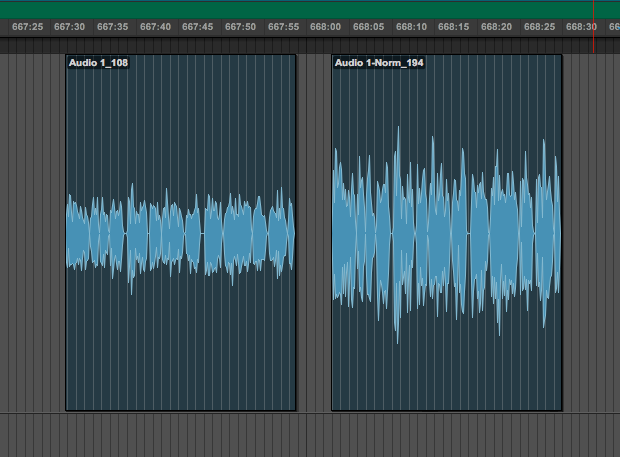
One question.As I'm now not doing much processing and am recording at a much lower volume. When I normalize at a raw level for some reason it cranks the audio up immensely. How do I fix this?