Sending in a revision

I have submitted 2 toys to VB. The second try came back as "background noise" and I am looking for feedback on my revised file. I treated my room again on the ceiling and I think I have the boxy reverb sounds felt with now. Can anyone give me feedback on this last file? Thank you so much community!
https://soundcloud.com/user-849354126/vb-harlow-8861f378ffa405cebcb8/s-HuR6I
Please sign in to leave a comment.
Sorry---obviously not TOYs! It's TRYs
Hi Melissa
The recording still sounds quite boxy and boomy. Are you recording a bit too near to your microphone? I can also pick up several mouth noises and plosives for which I believe you're recording too near. There's also some background noise. It's not room echo, but there's some noise like a hiss noise. Are you using any processing? If so, would you please share a 100% raw file?
Also, can you let us know which equipment you're using to record? Let me know!
Hi Angela,
I may be recording to close to the mic because I turned the gain knob to about 10:00 then I normalize to -3db. You are suggesting just to stay away from the noise reduction? I am good with that but just need to understand what may be causing the low grade hiss. I literally turn everything off in my house even though my space is quite dead. Can plugged in electronics make low grade noise even if they are not running?
Also, can you explain boomy? You are so much help. Is there such a free class or training for audio VO tech. There is so much on the internet I just need to start from the beginning and understand how to make adjustments and why. Does that make sense? It's like trying to drive a car without going through drivers ed! I can't afford expensive coaching right now although I did some coaching in the beginning which was very helpful to start.
Melissa
Hi Melissa!
I gave some feedback on the hiss in the other post but let's keep all the comments here so we don't lose track of the conversation.
I believe the noise is coming from a piece of your equipment + excess gain. Do you, by any chance, have another microphone you can try? For the excess gain, I suggest you reset your preamp's gain by lowering the knob all the way down and start adding the gain little by little. You may want to stop once you realize the voice is coming up clean and with good levels. There's no need for it to be too strong as you can always turn the volume up in your DAW!
Boominess refers to an excess of low frequencies. This means that your mic may be capturing a little too many low frequencies which damage the overall frequency response of the recording and making the voice sound quite dull. I checked your original unprocessed file and realized the boominess was being created by the noise reduction! As this plugin was trying to get rid of the hiss and the sibilance in the high frequencies, it ended up filtering too much and leaving all the low frequencies. This is one of the reasons noise reduction is not recommended!
About training, there are various ways in which you can get training. I suggest you try with Gravy for the brain. They have a lot of resources in regards to voice acting and recording! You may also want to look for courses or classes from different universities online. We also created a guide with some places where you can get training! You can read it here: https://help.bunnyinc.com/hc/en-us/community/posts/115000468024-3-Ways-to-Learn-More-About-Voice-Acting
Hope this helps!
Yes Angela, everything you say helps! I will try the gain knob and work my way up. Does normalizing affect the quality of the audio other than just increasing the overall volume? If I record with the gain way down what is the best way to amplify the recoding? Normalizing or amplify? Or are they the same? Again probably a stupid question but maybe there are others out there wondering the same thing?
Melissa
Angela,
This is in response to your post on my other post lol! I will keep everything here.
I tried turning the gain all the way down and creeping back up until it sounded good, like you suggested. I think it really made a difference. I only normalized and sure enough it sounds better...at least I think. I didn't need any further processing and the file sounds clear, rich and less hiss. Ughh. When I get a chance I will record another sample and post it. I hope this is helping others too.
Hi Melissa!
When it comes to putting the volume up, I usually use the fader from my DAW to just turn the volume up. That doesn't add any processing, compression or anything! I'd then normalize (depending if the recording needs to be at a set volume) and export it like that.
The amplify from Audacity is basically just a limiter (a very strong compressor) for which it's better to not use it in any way!
I look forward to a new recording!
Hi Angela-
Happy Monday!
What is the same process in Audacity as your fader? This is getting good! thank you!
Hi Melissa
This is the fader or volume controller. Each track has its own and you can control the volume for each track you have in a session.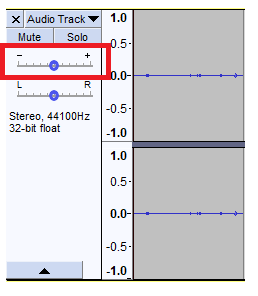
Oh sure! Thank you for sending the screenshot!!!
No problem! Glad it helped :)