My revised submission was immediately rejected

Hi
I sent an initial sample for my application. It came back with a lot of feedback as below. I then went to work on this feedback, ensured all this was addressed, assured myself that the second revised submission was audibly clear and passed the ACX check in Audacity for acceptable voice quality. Surprisingly, the revised sample was also rejected within a few minutes of submission. I've attached a link to both samples and would like to understand why the same feedback was given in both instances.
1) Room Echo - The acoustic conditions in your recording space are not ideal. Proper treatment to prevent room echo and reverberations is a must when trying to achieve professional results. Please re-record in a room/studio/booth with proper acoustic treatment where this won’t be a problem.
2) Mic Technique - Summing to the previous issue, your voice sounds removed from the microphone, which only augments the audible room echo. Remember to speak closely into your microphone, to always use an appropriate pop-filter and to check your levels while recording. For a VO artist, the microphone is an instrument.
3) Mouth Clicks/Noises & Breaths - Your deliverable is affected by these sounds, which should be always edited out carefully and seamlessly. Please, after re-recording, make sure you take care of the noises corresponding to the start and/or ligatures of words/sentences.
4) Distortion/Clipping - Your submission presents severe acoustic distortion, with an audibly and visibly clipping signal.
https://drive.google.com/file/d/19hK8XnY2E4dY-Xqo0dIfse63vny3o2VC/view?usp=sharing
https://drive.google.com/file/d/1XdnL_kgp90dqiJXdNDVt5Jt1ublYKbD_/view?usp=sharing
Please sign in to leave a comment.
Amazing work, Jag!!!
I think my work here is about done... I'm very proud of the progress you've made since we first began this thread, hopefully, your ears and brain are now super trained and tuned to pick up on the subtleties and on the larger issues that we've been able to resolve. It's taken us a while but in my opinion, you can consider your VO Recording 101 as a successfully finished course!
I'd grade your recording a 95 out of a 100, with only the itty-bit of echo left to fix, but it's not a deal-breaker for us in any way! If you can beef up your padding, keep the mic positioning and get the NS-1 plugin, you'll be golden! I can also hear a marked improvement in your delivery, which serves to prove that this was time well spent! Not only did your recording technique benefited from our exercises, but you're now a better reader, so please keep it up!
I took the liberty of making a quick comparison file of your first sample vs. this last one... to me it sounds like night and day! I really appreciate your willingness and hard work, mate. You truly knocked it outta the park! Thanks for staying positive, receptive, and open to all the changes and input. We love hearing great audio and it's even more satisfying when we can help someone to attain a great sound!
I'll stick around until your invitation to re-apply is successful, so don't be a stranger!
Congratulations!
Hi, Jagannathan!
Thanks a bunch for reaching out to us, it is a great signal when prospective talents use this community to solve their audio quandaries.
I'm the Quality Control Agent who issued those revisions for you, the reason being that unfortunately, they do not meet the spec and standards to which our talents work and which our clients demand from us.
To properly help you, please give me a detailed account of your audio equipment, DAW of choice, settings used and every information you can gather about the setup which you plan to use for VoiceBunny. Including pictures of the recording space is highly beneficial and encouraged, so don't be shy!
I'm sure we can bring your audio quality up to par in a very short time 😉
Cheers!
- Héctor Adolfo Ituarte (VoiceBunny QC Agent)
Thanks for the reply and for building confidence that you can help me bring my audio quality on par with your standards. That's very reassuring and I am thankful to you for that.
I'm at work right now. I'll reply with the details you requested when I get home. I must tell you I'm feeling shy already for sending you the pictures of my recording setup since it's not a high investment setup. I've kept my initial investments pretty low but I do have a good condenser mic and audio interface. Quickly, I use a PreSonus condenser microphone with its audio interface going into a Windows 10 laptop and my DAW is Audacity. I don't have access to the settings I use in Audacity. I can send that to you later today.
Regards
Jagannathan
Hello,
The specific equipment I use for my home recording is:
PreSonus Audiobox iTwo Studio USB/iPad hardware/software recording kit with Condenser microphone and a Wright Wp 101 Pop Filter
Audacity 2.3.0 on Windows 10
Audacity settings:
Mono channel, Recording volume 0.87, Playback volume 1.00, Project rate 44100 Hz, Apply macro that does equalization, RMS Normalize and Limiter as attached in the image below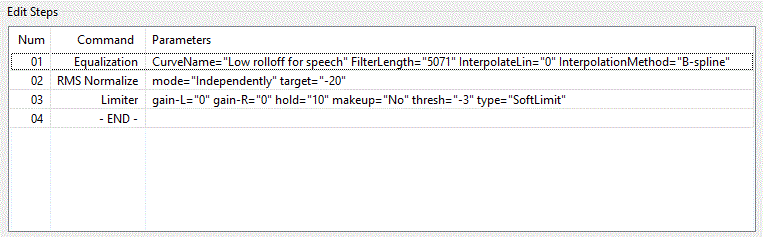
I also have installed the Audacity plugin called ACX check that tells me the audio file meets ACX requirements
Now, I've attached images of my recording setup in four different comments since it does not let me upload more than 2MB image at a time. I'm embarrassed that my setup looks this way :-)
Second image
Third image
Fourth image
My recording setup is in a 2.5 ft X 3 ft box that houses the condenser mic and pop filter. The audio interface is in another partition below. This setup is in a room that has a 10 ft ceiling. This box that houses the mic etc is made of wood if that's useful information. I've surrounded my mic with pillows on the sides and right behind. I've been wanting to buy acoustic foams but not yet spent the money on this.
Most illuminating!
Your photographs shed light upon a couple of grave issues to be solved in order to achieve a good sound out of your gear.
Step 1 - Levels
Your recording levels are way too high. An ideal level entering your computer/iPad should be peaking at around -12 to -6 dB. You should dial the gain on your AudioBox by at least 50%. Also, when recording just your voice, turn off the line input (with the guitar symbol.) Before committing to a particular reading, record a couple of test takes and listen from your computer to detect possible audio flaws, such as saturation, distortion, plosives or sibilants (echoes/reflections will come next so keep reading.)
Also: my personal/professional recommendation is to ditch Audacity. We do list it as a freeware option for many pros who are just getting started, but honestly, options like Reaper will allow you a more granular, professional way of controlling your audio, recording, mixing and exporting your audio files. It also offers a 60-day trial and purchasing a personal/small business license is very affordable, so just click on the link and try it out while we fine-tune your sound 😃
Finally on this subject: forget the ACX plug-in. It's not working for you right now nor do I think it will do you any favors in the future. Frankly, I've been in the business for a long time and I've never used it... not even once.
Step 2 - Acoustic Treatment
Another issue of yours is that confined little cube where you've placed the microphone: spaces of the sort/size will render you unable to control the reflections and lingering frequencies in your speech (especially with high energy readings) as the soundwaves penetrate the cushions and continue to bounce around the space at the speed of sound.
I'd recommend to hold off on the purchase of the acoustic foam as I don't see it working in that little niche where you've positioned the microphone. Try building a little blanket fort instead, using PVC pipe or other light structural option would be best and cheap too. Repurposing towels, blankets and whatever heavy fabrics you can get your hands on will make for amazing acoustic materials. If you can, search for memory foam cushions/mattress overlays. They are not as expensive as the good kind of acoustic foam and they are just as or even more effective at killing reflections. I've been using one inside a small closet and it's working wonders.
Also: avoid parallel surfaces. Cubes have parallel surfaces (4) which will invariably produce frequency lingering. Whatever you build, try to make it into a pentagon, as the lack of parallel walls will make it geometrically better frequency wise.
Step 3 - Testing
Go do this and record some clean takes for me. No processing except for normalization (at a -3 dBFS Peak Value) and careful, seamless editing of breaths, mouth noises and such. This will probably take some tries so arm yourself with patience! Whenever we reach peak sound from your recording environment, we'll be able to think about applying processing if needed.
So, go out and take care of these tasks and come back with your first test runs!
Cheers,
Héctor.
Thank you so much for your detailed assessment and tips from your years of experience. I'm sure i can work on these inputs but it may take a few days before I revert with my test takes. Presonus has given me their DAW Studio One along with the mic etc. I never got it working though. Is this as good as Reaper that you have recommended?
Hi,
I modified my setup based on your suggestions and below are images of the new setup. I wanted to know if you can take a quick look at my setup and hear the attached recordings (One taken with Audacity and the other with Reaper) to ensure I've fixed the recording setup issue. If you could give me your valuable comments, I really appreciate it. If the setup is good, I'll go ahead and edit it properly.
Audacity recording
https://drive.google.com/open?id=14NkeCpWIa8ARKjZg9ekcRXq0zxRK7CnG
Reaper recording
https://drive.google.com/open?id=1AiIM5FyY6okk1MD1H3iCkufzY7J8Ynyz
Thanks in advance
Jagan
Hi, Jagan!
Thank you for your interest in following up with this process. I must say, the voice sounds better but the echoes/reverberations are still very present.
You need to apply much more acoustic treatment and I would recommend coming out of that dresser completely. It's easier to build a more functional pillow fort of sorts and handle second-order reflections (which you'd have by working in a bigger space), than what the first-order reflections of such a confined space are now doing to your audio. Also, remember to dial back the gain a little bit more and to ride the microphone: speak very closely into the mic, with the minimum safe distance marked by your pop-filter.
So, don't despair and try to get the acoustic environment as close to neutral and dry as possible. Refer to this sample for the kind of quality you should be aiming for. Use that audio as your reference and benchmark.
I hope that you can find the best way to treat your recording space! Please keep us updated!
Cheers!
- Héctor.
Hello Hector
Hope you had a great Thanksgiving weekend. I dialed back the gain, spoke closely into the mic and also got out of the dresser and recorded the attached voice sample in a blanket fort as far as I could understand what it meant. I am also a little confused about the reference sample you attached, since that also seemed very loud and echoey. To help me clear this confusion, is there a way in Reaper or some other software for me to detect reverb in the audio waveform so that I can aspire to match this reference without having to keep bothering you? Please review this sample and let me know if it is getting closer to the required quality.
https://drive.google.com/open?id=1fZSk776YvFW2PfM9Q9yZQ1tQMZCIvla0
Thanks
Jagan
Hello Hector
I followed your suggestions and since you did not reply, I went ahead and submitted my application again. I again got rejected with the following comments. The suggested link to improving acoustics (https://help.bunnystudio.com/hc/en-us/community/posts/203461624-Tip-5-Basic-acoustic-treatment-is-not-rocket-science) starts off saying one should record in small spaces - very counter-intuitive to what you had recommended. I dialed back the gain as you suggested but now I get a recommendation that my volume is low. For your reference, my audio recording is at the below link.
https://drive.google.com/open?id=1Fh0m3pcgzUSbbZbbgPodZcu2rh_h0kk7
I'm kind of at my wit's end to satisfy VoiceBunny requirements since I do submit VO with this setup to other portals where they don't usually complain about my acoustic quality.
The acoustic conditions in your recording space are not ideal. Proper treatment to prevent room echo and reverberations is a must when trying to achieve professional results.
You\'ll find tips on acoustic treatment on our community page: https://bit.ly/2MrNsSV.
Your recording is heavily compressed and/or limited. It\'s affecting the dynamics and quality of the audio. Instead, please raise the volume via automation or normalization to -3dBFS peak.
Your recording sounds undesirably over-processed, which is impacting the quality of the deliverable. It may be due to a noise reduction plugin, an EQ, or a noise gate, for example.
Hi, Jagannathan!
Please accept my heartfelt apologies, we're just realizing some responses from around year's end didn't go through and a couple of threads were left unintentionally unattended. Once again, kindly forgive us for any delays and inconveniences.
Let's get right to business, shall we?
The issues with the acoustic conditions in your recording are still present, but very much improved from what they originally were, so congratulations! I'd love to build something for you but distance prevents us from being able to achieve that. I'd recommend trying to pad the surfaces around your mic with more acoustically absorbent materials although the mic is sounding clean and with very nice frequency response. Please experiment and try to get the driest (devoid of echo) environment that won't cause boominess or boxiness, as low frequencies may tend to linger in spaces with too much padding, while high frequencies won't survive, causing that potential imbalance. Unfortunately, this is a trial and error process. One 'gets to know' the recording space and mic response in time so that it becomes easier to work each day or if changes need to be made, so please, hang in there and try to nail down the acoustics.
As for a more comprehensive analysis of your audio, let's look at this:
Fig. 1: Amplitude Analysis of your waveform.
We can ascertain many facts from looking at your recording this way. In magenta, the arrow, and boxes point to the amplitude statistics and the loudest peak from your waveform. As you can tell, this peak is not within spec as per Bunny Guidelines. This indicates two things: your gain while recording was too high and you didn't normalize the waveform afterward. Normalizing to -3 dBFS is useful to comply with Bunny Guidelines for deliverables, but won't fix any harmonic distortion printed in your original signal, as the sound was created with that compromised dynamic range. This is what may be interpreted as compression or limiting, as the sonic characteristics of harmonic distortion can be achieved through these tools or high gain levels while recording, with proximity effect... the options are vast and ample.
Now, recording should be easy and straight forward. Notice the green square: it indicates the maximum peak level your read should attain while recording. Your tracking gain should render a signal that sits between -9 to -6 dB so that no distortion will be printed. This also leaves headroom so that one can normalize the waveform or adjust levels should there be a need for that, without the risk of clipping and distorting.
The blue square indicates the -3 dBFS Peak Level that your final waveform should have after normalizing. This is when you can listen for breaths, mouth clicks, and other noises so that you can easily mute them and edit them out of your take. Follow this guide should more in-depth information be needed to master the procedure.
Finally, the red squares point out the peaks that surpass our desired -3 dBFS level. A properly normalized waveform would not have these peaks out of range.
Conclusion
You're very close to achieving the sound we and our clients are looking for, so don't quit just yet! Follow our recommendations and you'll be there in no time, just hang in there.
As you can gather, if this were to be a project for a client, these very observations would prevent us from accepting the submission, and the time to address the issues and resubmit is very short in most projects, so we need to master these abilities so that you can be able to handle paid projects once you're accepted as a Pro.
Please, come back with a couple of samples made following these recommendations and we'll be happy to keep on helping you. We love it when a fellow pro solves their sonic quandaries. I'll be looking forward to your new post!
- Kindest regards!
Hi Hector,
Thanks a lot for the detailed analysis even if after a long time. I thought you had pretty much given up and hence did not reply. I'll work on your feedback and reply back with a few samples over this weekend.
Hope you're keeping safe amidst all the COVID crisis.
Regards
Jagannathan
Hi Hector,
I've done a lot of changes to my acoustics since my last submission for your review. I took one of my practice recordings in my new setup and attached it here for your review. I read through your analysis above and I believe the amplitude analysis conforms to the limits you had mentioned as far as I can tell. Looking forward to hear from you.
https://drive.google.com/open?id=1-pMZ-GhDlvc6HzQX35sB8VIXb-DhqDbT
Regards
Jagannathan
Hey there, Jagannathan!
Thanks a bunch for the effort and the clear improvements in your recording, we're on the right track! Here are my observations.
1) Room Echo - This issue is still to be resolved. The echoes are audible enough that even heavy processing won't mitigate the issue (I tried). Please refer to the link and try your best to resolve the problem. This is a major fact that will continue to prevent us from accepting your recordings.
2) Editing - Your file has a breath present before the start of the reading. Also, the silence at the start of the file is about 2 seconds long (we request every deliverable to have a maximum of .5 (point five) seconds of silence.
3) Levels - I don't know if the levels shown by your deliverable are those from origin (what you get while recording), but they are not up to standard, peaking lower than our -3 dBFS prescribed level. At the present levels, however, there is no distortion or other gain related issue with the waveform.
Fig. 1 - Reference Image.
Please refer to this guide to look for advice that can help you mitigate the reverberations in your studio as much as possible. Refine your gain levels if possible and if not, just keep them at what they are, never forgetting to normalize once you're ready to edit and export. Editing help is available in this post.
We're 60% there, mate! Stay strong and healthy and show us what you can do!
Hello Hector,
Frankly, I'm at my wits end to see how to satisfy VoiceBunny's requirements and am seeking your advice on the following:
Thanks
Jagannathan
Hi, Jagannathan!
I see what you've done there and acknowledge you're trying very hard to mitigate the reverb, but that enclosure is not helping and might be the culprit behind your echoes situation.
First of all, as any box, it has parallel surfaces, which will cause the sound to bounce back and forth in that plane. I'd suggest you reconsider your mic placement and try to find a corner in your room where you can set up a pillow and comforter fort.
As for the echoes, no plugin or software can tell you how much echo you have, as the detection of this is merely auditory and determining how its presence affects your waveform is a skill that only time and experience can give you. When one applies noise reduction at a certain threshold/level it gives us a rough estimate of how much of your signal is affected by the noises/reverberations vs. the usable spectrum of your voice. Unfortunately, reverberations coexist in the same frequency ranges as the desired frequencies of our voice as they are harmonics of it, hence removing them completely from our recordings is next to impossible (and no one would need acoustic treatment/design ever).
I'm hoping you can test and test and test again, also training your ears to detect the echoes, because if you can't hear them while recording/editing/uploading, it won't matter how many evaluations we make of your audio. This is something for you to get under control through experimentation alone.
Please use this sample from one of our top talents as a benchmark and reference when comparing your audio for quality. His tone is obviously different from yours, but this is the sonic quality of a top pro in our platform, which as you can tell, we're still a long way from achieving (although it's not impossible).
Hopefully, you'll keep hanging on! I have faith that you'll make it!
Hi Hector,
Hope you and your family are keeping safe. After your thorough analysis and recommendations, I have shifted my setting to another room with a mattress fort. I've recorded the Voice bunny sample script and run it through an amplitude analysis that says my peak amplitude is -3.42 dB. I also added a 0.5s delay at the beginning. I'm keen to hear your review. From my own hearing of my old recording and this one, I see this is far far better but your expert ears may catch more than what my untrained ear can detect. Looking forward to hearing from you.
https://drive.google.com/open?id=1sGetfjTB9Fyn9E1yaOFzikReNbvCG6tz
Regards
Jagannathan
Hey, Jagganathan!
Everyone dear and near to us in Bunny and at home are safe and sound, thank you for the kind wishes!
Man, this sounds so much better! I can tell you're a bit removed from the microphone but this amount of echoes is manageable and you can certainly bring them down so that you eliminate them completely. Before dispensing more advice on your acoustics, I'd love to see a picture of how your mic and everything else is set up right now. But for the time being, kudos!
This audio of yours is lacking a bit of editing and 'DAW love' to make it sound its best. Please download and run Reaper so that I can help you come up with some presets to make it easier on you. Click here to download your audio file and hear what it sounds like after I cleaned it up. Instead of telling you what I did, I'd love for you to take the time to hear it and compare it with your waveform in your DAW to see if you can tell me what the differences are that are easily audible and/or noticeable.
With your improved acoustics, we're free to move on to a quick coaching that will help you produce audio with the quality your voice and our platform deserve.
Thanks for being such a good sport and congrats on the progress once again!
Thanks Hector for the encouragement. Now, I'm more confident of getting to your desired level of quality. I had a quick and dirty setup to check the mattress fort from an echo reduction perspective and that was the reason for me being a bit removed from the mic. I'll get this setup done properly and then share the picture of the setup. I'll also download Reaper and then play your edited file. I really appreciate you spending time to help me get to the desired level of quality.
Thanks yet again
Jagannathan
Hello Hector
I've setup my recording place to look more presentable. Attached photos of my setup. Because of COVID situation, we're locked down, so I cannot visit any store to get a more permanent setup that will work. For now, I'm making do with what I have at home.
I recorded another file with Reaper this time and uploaded at the link below. I already see that the peak amplitude is -0.5dB outside the range but I don't know how to normalize to a peak of -3dB like I could do with Audacity. I'm not even sure if normalization is the way to do it.
https://drive.google.com/open?id=1TNExWMblPtmZEtVYvB2NwFJwGNojvZei
I also reviewed your edited file with DAW love and see that you've made it sound a little louder and removed all clicks and pops and breathing noises.It sounds much better.
Please review my file and my recording area setup and also send me the Reaper presets that I can run my recording through. Hope I'm getting closer to becoming an approved voice over artist at Voice Bunny. Thanks much for your help.
Regards
Jagannathan
Hello Hector
Looking forward to hearing from you.
Regards
Jagannathan
Hi, Jagganathan!
Thank you very much for the effort put into upgrading your setup, I can tell you've really tried and it shows on your latest sample!
Now onto the recommendations:
1) I would place the microphone in the opposite corner as close to those mattresses as possible, and would even suggest to close off the angle a bit more if possible. The current placement of your mic is not taking full advantage of the padding provided by your setup and it's what causes the remaining reflections to be heard in your recording. Try to place the mic so that the center/back of it is dead on the angle of your mattresses and so that it's surrounded by them with a clearance of 3 to 4 inches maximum from every angle.
2) Try to repurpose the materials used currently for the 'booth and desk' section and use them to build a fort above the mattresses. I know this can be tricky, but that will put an end to the reflections from the ceiling and the top of the walls.
3) If you have some mats or soft fabrics, try lining the floor underneath the mic. Old pillows and cushions can also work for this purpose.
As a reference, here's an audio of mine recorded in a run-of-the-mill closet lined with winter clothes and a memory foam mattress cushion (which works wonders as an acoustic material by the way). This is what you should strive to achieve echoes wise. Disregard the EQ profile as this file is basically unprocessed (just normalized and evened out through automation), with edits to remove mouth noises and such. I achieved that kind of reverb control by experimenting with the angles in which to position the mic and the distance at which to keep the padding materials (the memory foam cover and a bunch of sweaters) in a '365º' way, minding the sensitivity lobes of my particular mic, careful not to 'drown it' as that would cause boxiness or other undesired effects.
Give my suggestions a whirl and use the example as a reference and try to come up with as close as an example as you can, so that we may move on to the next stage.
Cheers!
Hello Hector,
Hope you're staying safe and had a good weekend with your family! I looked at your suggestions and your sample. What I also tried was a different setup inside my coat closet with a blanket around the sides and on the wall right opposite my closet. Please find attached the audio sample I recorded with the same script you used. Please let me know your review comments. You had also mentioned you will let me know some Reaper presets once I've downloaded Reaper. May I request you to let me know what FX you apply on your files to make it sound good?
https://drive.google.com/file/d/1YH0dhnItigIdDLxKcnnXdbbf65X9BEhg/view?usp=sharing
Thanks
Jagannathan
Hey, Jagganathan!
So far, so good! Everyone in the homefront is doing great. You don't know how pleased and proud I am of this progress, it's huge!
Kudos on the massive improvements! I'd recommend you use another blanket if possible to double-down on the treatment, this space is working great. Also, try to cover the 'top' portion, not just the walls on the sides, as some reflections tend to bounce back quite fast from the 'ceiling' part of one's booth. Still, this is amazing, I'm so happy for you!
As for the presets, I can generate them for you and teach you to use them in no time, so let me know when you've installed Reaper so we can work on that.
Here's your sample, processed through a noise gate (to remove the slight mouth sounds still left), I trimmed the start/end of the file and manually leveled the different parts of your reading so that the peaks wouldn't overpower the valleys.
This takes some practice but it's a very straight-forward and logical thing to do once you've gone through the process a couple of times. I also applied a slight low-cut filter, which fixed some of the boominess (and even a part of the audible reverb) in your sample. One of the downsides of having to record in a make-shift booth (like one's closet) is that we'll always have to deal with such frequency issues at one point or another, but resolving the slight bass-boost of one's booth is a hell of a lot easier than dealing with echoes.
My only concern with your file is that from [00:19 to 00:23] some electric noise polluted your signal. This might've been a weird occurrence as I've never heard such a noise in your previous recordings, but it's still something worth figuring out and to be on the lookout for.
Keep up the great work! Let me know once you've installed Reaper and begun to play around with it. I've made guides for other pros on how to use it efficiently and I would love to do the same for such a dedicated talent like you.
Have a great week and may all of your dear ones be safe and healthy!