🐇🎧 How to share your Samples in a post for QC Review!

🤔 Have you received an email from Support with some feedback?
At Bunny Studio, we want our Pros to feel supported and confident in their work!
That’s why our QC agents are available to share feedback directly with you, alongside other talented Pros in our Community who are eager to help with their expertise!
Currently, QC agents don’t provide one-on-one support via email, since they are not the main support channel for Pros. Instead, all feedback is handled in our Community – Get Feedback section, where conversations can be open, collaborative, and mediated if needed!
This allows us to keep everything transparent and to make sure you’re getting the most out of QC insights and advice!
🥕 How to Share Samples in our Community - Get Feedback section!
Since our Community doesn’t allow direct file uploads (for security reasons, and to avoid spam), you’ll need to use a file-sharing app or platform to post your samples. Our QC team will be able to review your most recent quality, and help you get rid of any issues or audio/technical problems you might be facing!
The ETA for a response from QC is up to 5 business days, since sometimes a more detailed analysis with other agents might be necessary. The ETA starts counting from the moment you succesfully share a Sample, via one of the options below!
Here are some options that are easy to use:
-
Google Drive: Upload your audio file to Drive, right-click it, and select Get Link.
Make sure the sharing settings are set to “Anyone with the link can view,” then copy and paste the link into your Community post. -
Dropbox: Similar process as above! Upload your file, click Share or Copy Link, and ensure permissions allow others to listen without logging in.
-
SoundCloud: Create a free account, upload your audio, and share the link in your post!
-
Other free apps: Services like WeTransfer (for temporary links) can also be used, as long as they generate a direct link you can share.
😕 Can I share a recent project link instead?
Typically, unless your deliverable in that project is extremely recent, that's not the best choice.
Our team requires to listen to your most recent audio so they can assess your current setup, quality and context. That's why, most of the time, a fresh Sample is preferred.
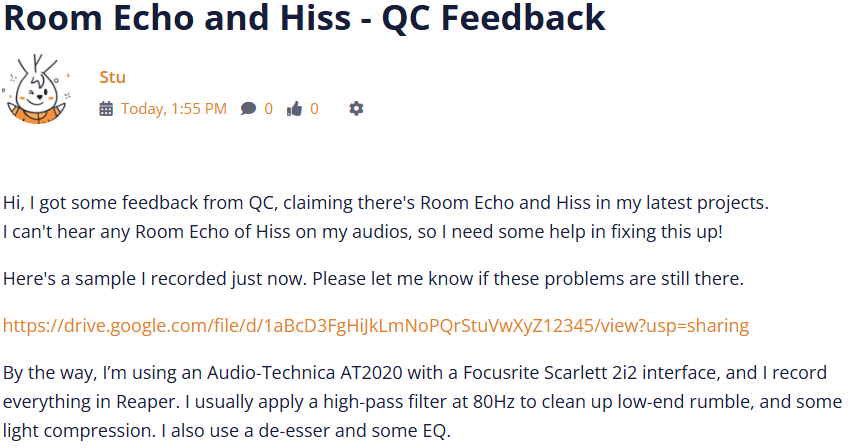
Here's an example of a great post, containing most information ready for our QCs to analyze!
And, to assist with minor issues that a talent might be able to try and fix for themselves, here are some suggestions for the most common Quality and Performance issues our Pros may receive feedback for:
• Common Quality issues and recommended solutions (with DAW tips!)
• Common Performance issues and recommended solutions
If you are facing any technical issues that are preventing you from creating a post in our Community, please contact support@bunnystudio.com, and we'll do our best to help!
Post is closed for comments.