Recording Problems: Hiss Noise

Hi!
This is the first webinar in a series we'll be hosting alongside our Quality Control team where we'll discuss recording problems. We’ll talk about the most common issues we've come across in your recordings and give you out some possible solutions and tips to get rid of them.
This first one will be focused on hiss noise. This because we’ve found it’s the main and most common problem we encounter in your recordings. We know it’s a problem many of you struggle with so here we are to help out!
You can watch the video recording by clicking here or you can keep reading this recap.
What is hiss?
‘Hiss’ is a type of background noise that’s always present in a recording, but It won’t really be audible if you keep it under control. However, if the noise is noticeable and you can hear it clearly with your headphones or studio monitors, then it poses a problem.
Hiss is often described as a prolonged "s" or "sh" sound and has components across the whole frequency spectrum, even if it appears to be more prominent in the high-frequencies. Basically, hiss is a form of white noise. Sometimes, depending on the nature of your recording gear and filters applied, it can be heard clearly as well in the lower frequencies, too.
When you use a noise reduction plugin to try and get rid of it, you'll be filtering out not only the noise itself but parts of your voice as well. Removing elements or parts from every frequency present in the recording will end up damaging the whole structure of your voice. As such, we don’t recommend the use of noise reduction plugins to control hiss noise as it will, more likely, damage the recording more than with the noise.
Now, we have an exercise for you. The next clips you’ll listen to are examples of hiss noise in different applications and under different equipment circumstances. If possible, use your studio headphones when listening to the files and compare how the clips sound in different headphones and studio monitors.
Listening
SoloHiss1.wav The sound of ‘hiss’ for reference purposes.
SoloHiss2.wav An example accompanied by a ‘hum’ at 60Hz. We add it because sometimes hiss from equipment can be accompanied by hum.
Test1.wav This file was recorded with a AudioTechnica AT2020 microphone using the Avid Mbox 2 interface preamp.
Test2.wav Recorded with the same microphone, the AT2020, using a Focusrite Liquid Saffire 56 interface preamp.
Test3.wav Recorded using an AudioTechnica AT4047, and the Universal Audio 710 Solo’s preamp.
Test4.wav Recorded using the Shure SM7B mic going into a Camilo Silva Preamp.
Keep in mind that all these files were recorded under the same acoustic conditions.
What causes hiss?
Now that you’re more familiar with the sound of hiss under different circumstances, let’s talk about what causes it.
There are two main sources for hiss:
- Internal sources (related to your recording setup)
- External sources (anything that can interfere with the sound, like electrical interference)
Internal sources
Depending on the brand and quality, mics can be a primary source of noise. USB mics, for example, bring a very audible amount of noise to recordings so we recommend you avoid using them altogether. Bad quality or damaged mic cables can also contribute a lot of noise especially by adding a 60Hz low-frequency hum to the already existing noise.
Preamp gain can also be one of the culprits of excess noise, as low-quality interfaces or preamps can produce high levels of noise. You can find great preamps and interfaces for all budgets so try to find one that not only matches your budget but provides you with great quality audio. Also, keep in mind that even if you have the best preamp, if you use high levels of gain to record, you may end up with extra noise as well. Remember: the higher the gain, the higher the noise.
Your equipment’s A/D - D/A converters can also cause noise problems. This because the conversion may not be done well and some information can be getting lost in the conversion thus generating noise. Usually, these pieces are included in your audio interface and these are usually very good, however, it’s also good to read reviews and try the equipment out before buying it.
Ground loops can also cause a lot of noise. This is a special type of noise present regardless of the volume used in the equipment. It's very common to get noise because of ground loops as these are caused by poor or damaged electric power sources. This is really common with two pin connections, so try to use always three pins.
External sources
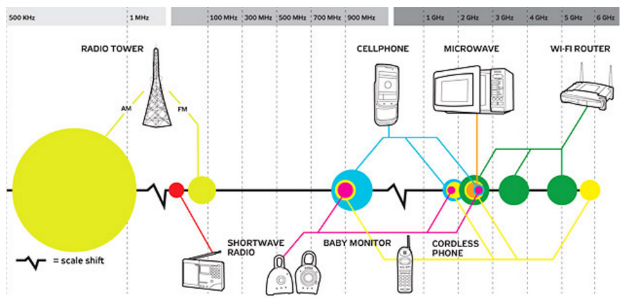
External sources are everything that comes from outside of your equipment such as fans, AC devices, etc. as they are easily picked up when recording near them. Also, the EMI (Electromagnetic Interference) and RFI (Radio Frequency Interference) can add unwanted noise to your recording as well when recording around radio sources such as cell phones or TVs.
The following graph will give you an idea of the interference some devices can create in your recording equipment.
How can you fix Hiss?
Now that you know what are the main causes of hiss noise, here are some ways for you to fix your issues.
- Identify the source of the hiss. In order to be able to fix hiss, you first need to identify where it’s coming from. Follow the recording chain starting from the end and going backwards. Unplug all devices and plug them back one by one to determine which one may be producing any extra noise. Remember that every electronic device has a certain amount of hiss. As we start adding equipment to the chain, the noise of every component is going to add up: the more we have connected, the louder the hiss should be. What you want to keep an ear to is to big changes to the hiss level between elements. When reconnecting, you'll be able to determine which component is adding too much noise to the hiss level, allowing you to make a decision on what to do with that piece of equipment.
- Check out the room tone of the studio. Without talking and in complete silence, make a recording of your space. This will let you determine your recording space’s noise floor. Make sure you set the gain of the preamp in the middle of the knob or just a tad higher so the equipment doesn’t add any unwanted noise. You want your recordings to have a noise floor of -60dBFs or less. If this is higher, your problem could be within your space and it would be appropriate to get some acoustic treatment.
- Check your surroundings: Over time we get used to how our spaces sound. This can be dangerous as there can be noises in the back all the time you don’t notice. Make sure you keep an eye on your surroundings to pinpoint any noise-generating devices like fridges, AC equipment, or even windows that can let noise from the outside to be present in the recording.
- Cable setting: Avoid running audio cables parallel to electric cables, and arrange them vertically instead. Use cables that have better isolation as these will last more as well.
- Interference: Avoid having communication devices, like cellphones, landlines or any other type of radio devices near your recording space.
- Levels: Make sure the levels of your equipment are properly adjusted. If you’re having issues with the level of your recordings, try to get yourself nearer to the mic instead of using too much pre amp gain to avoid any extra noises. Remember that you want to start off with a clean recording that needs little to no cleaning in the editing stage.
- Invest in good gear: The tools you work with will define the quality of your recordings. If you are interested in building a career as a voice actor from your own home studio, all the equipment you use will definitely make a difference in your results. From acoustic treatment, to preamps, it’s important for you to make good choices to avoid future issues. There are options for different budgets and the gear that works the best for you isn’t necessarily the most expensive. Make sure you try different options and assess your space thoroughly so you can get the perfect gear for your needs.
Q&A
Here are some of the questions that were asked during the webinar.
Does the Presonus Audiobox 22VSL rank on the list of acceptable preamps?
Angela: I would say yes, Presonus has amazing preamplifiers, I've used some of them and they're really good.
Juan: I would say that keeping in mind that it's also important how the chain connects, a good preamp by itself doesn't tell that much. You could take a lot of things from the Presonus depending on the mic you have, for example. Not all mics have the same sensitivity, so if you have a mic that requires a lot of gain to function, well, maybe that preamp is not going to be good enough for your set up. Make sure you have a good match throughout the chain. You should be able to do great things with this preamp depending on the other equipment you have.
Angela: Yes, I agree with that completely. This preamp by itself is really good, but it's also important to note that having a great preamp is not the only thing you need.
What is the best way to isolate gear hum, hard drive's low-frequency vibrations?
Sebastian: One thing is hum from electric sources as we talked, another thing is low-frequency vibrations from your space. As we said, it's pretty tough to do acoustically, and the best thing to do is to record as far away as you can. To avoid low frequency noises, I would suggest you to have a good mic holder, those tend to help in low-frequency vibrations but they are not perfect.
Juan: You could also get, for example, there are some really professional computer cases out there, so the more silent they suppress the noise and vibrations the better. You can try and be creative, try with isolating objects like a pillow or a blanket that will diminish the noise it's making.
Angela: For example Thermaltake makes great boxes. If you have a PC, these are really good and will help a lot with minimizing all of that computer’s internal noise. If the hard drive is external, it would be as Sebastian says: record far away from it. Or, if you have the option to unplug it while you are recording it would be a good option, too. However, you'd have to try different options to see if vibrations are really coming from the hard drive, or from somewhere else.
Please sign in to leave a comment.
If it is indeed a "hiss" and not simple room noise, then the two places to look are the microphones or the pre amps on you gear, with the pre amps being a strong favourite for the culprit. Even pretty good pre amps introduce noise (i.e. "hiss") if you have to turn up the gain anywhere near the highest level.
assemblage carte circuit imprimé
From my own experience, I'd go for the cables first. It is usually there where a hiss is filtered most of the time. After acoustically isolating the room, I make the recording with direct monitoring by software (Studio One or Pro Tools), making use of a noise gate during the whole recording. In this way, you can also add color to the sound through a light EQ and additional processes, including sound manglers.
I realize that this is a very old thread but the content is still important.
A friend of mine has background hiss that sounds a lot like the noise in Solohiss1.wav above. Do you remember what was done to reduce or eliminate that noise from their recordings?
Hi Tom. Tested with Waves Z Noise is a good option to remove it completely, but if you have overdubbed vocals, Izotope RX goes much better. Or if you prefer something more artisanal, a noise gate can help too.
Juan, Your suggestions might clean up the problem but they don't fix the issue. I was hoping to learn what was causing that level of hiss in the first place in that specific recording and how to keep it from happening again. We can also debate if using a gate is ever a good idea in voice work. I've read that Mr. Bunny doesn't approve of them because you will still be able to hear the noise behind the voice which can be more jarring than leaving the hiss alone..
I have a Blue Yeti USB mic. I'm planning on buying an XLR mic, sound console, etc., but I have to work with what I have for now until I can afford those. Do you have any recommendations on how to isolate/fight white noise generated by the USB cable?