Help for Audio issues

Hi,
My audition was rejected due to the following:
there is audible room echo (reverberation caused by your recording space) impacting your recording. Please ensure you record in an acoustically treated space or use a professional recording booth.
- your recording contains unacceptably high levels of hiss/white noise.
I was basically in a closet with a mattress around me and I used "kill hum" in garage band to lessen hiss. I don't know how else to get a quieter recording. Could someone help? Below is a link to the recording:
Thanks
Please sign in to leave a comment.
Hi!
Your audio does, indeed, have a lot of room echo and hiss. I believe the noise is coming both from the space (in the case of the room echo and some of the hiss) and from your microphone (hiss and muddy sound). Are you using a USB microphone by any chance? This could also be adding some undesired hiss to your file.
We hosted a webinar on hiss noise and another one on acoustics you may find useful as to what options you have to tackle these problems. Most of the time, just a mattress is not enough when the space you're recording in is not isolated enough. I suggest you try other isolation methods! We also have another article on basic acoustic treatment you can try out to improve in a simple yet effective way your acoustics.
Hope this helps!
Hello, Jeana.
Indeed your voice sound distant, and the mic is picking up undesired room ambiance. Also the levels of hiss are too loud.
What equipment are you using?
Best,
Juan
I am using a MacBook Pro, MXL 990 mic, iu2 interface, and garage band
Hi Jeana.
Yes, the voice sounds distant from the mic. Try to record closer to the mic, around 5 cms should be good enough. Make sure you use a pop filter to avoid plosives and proximity effect. I haven't used that interface before, and I notice it doesn't have XLR inputs so maybe part of the noise comes from there. Make sure you use balanced TRS to keep the noise levels down. Try playing around with the gain to find the best noise-ratio spot.
Also, the room where you are recording seems to be too reverberant. You need to find a way to make it less live in order to achieve better recordings.
I hope these tips help!
Best,
Juan
I have done some tweaking and would like to see if this file is up to the standards. Could you listen and let me know what you think?
Thanks,
Jeana
https://www.dropbox.com/s/8cs5gxuhbbg82rj/56DBFDD694C07D472FDF%20voice%20bunny%20audition2.wav?dl=0
Hello, Jeana!
I would have liked to listen again to the first file you posted to see the evolution of the sound, but's not there any more.
The deliverable still has a considerable level of hiss. You can easily notice the fade out when moving to silence between sentences. Perhaps you could try filtering a little bit the high frequencies to reduce the constant brightness which is a little bit hard on the ear. Also, using a clip with room tone instead of digital silence can work.
Maybe try pushing the preamp's gain back a bit to see if we could achieve a cleaner sound; by recording more softly, then raising the volume in the DAW. Better if you record at 24 bit!
Let us know how it goes!
Best,
Juan.
Hi Juan,
Hi Jeana!
The recording sounds so much better now! However, are you using any processing here? The 'p' sounds and some of the breaths sound as if they were tried to be filtered by noise reduction plugin. This also makes the take to sound quite thin.
I also notice that this interface doesn't have an XLR input. TRS connectors are usually not ideal for this type of recording applications as they're more susceptible to noise and interference. Make sure the connection of your interface is balanced so that this noise is reduced to a minimum.
Also, the edits sound quite harsh. This could be because of the noise reduction plugin or because you're cutting the takes to near to the ending of a word. Make sure you always fade your recordings in/out and leave enough space for the clip to transition smoothly from one are to the other.
Hope this helps!
Hello Jeane,
Thanks for sharing your recording. Besides what Angela mentions above, I would like to add that your voice sounds a bit distant from the mic. Subsequently, there's a bit of room echo that also pushes the voice back into the ambient of the room.
You’ll find tips on acoustic treatment on our Community page:https://goo.gl/vGqUIW .
This will help you achieve professional results.
Best,
Juan.
Hi Juan
I have purchased all new equipment, including an XLR Rode NT-1, Audient ID4 interface, and the Harlan Hogan Porta-Booth Pro. I am using Audacity to record. Could you listen to my new recording and let me know if it is up to VoiceBunny standard?
Thanks!
https://www.dropbox.com/s/bk3lmgc1ecsqpgf/voicebunnyaudition.wav?dl=0
Hi Jeana!
Thanks for sharing.
So, let me ask you. Are you by any chance adding a gate to your recording? If this is the case, it's set to be too fast so the endings and some beginnings of the clips are getting cut. If you're not using a gate, then this could mean that you're editing the recording in a way that is cutting some areas from the voice over that make it sound a bit unnatural. For example, when you say 'quality control team' the m sound is completely cut so it sound as if you were saying 'tea'.
Also, I can pick up some room echo on your recording. The Porta Booth is doing an excellent job, but there is still some room echo being picked up. More likely from around you. You can easily fix this by recording inside a closet, for example, so you can get the extra absorption from the clothes.
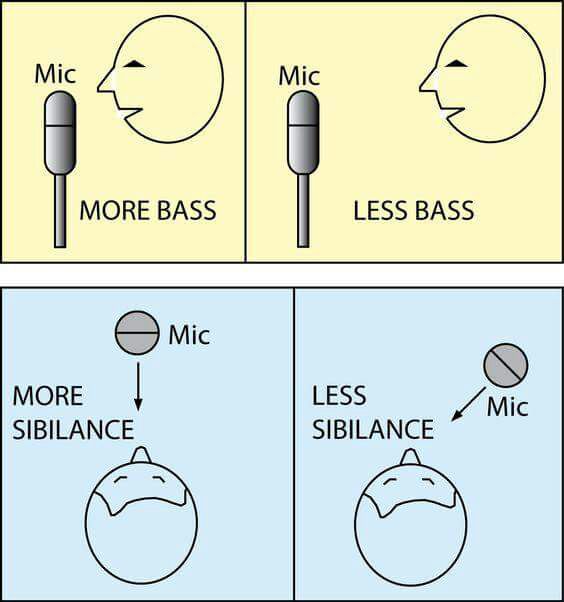
I also feel the recording is a bit sibilant. You could fix this by recording with a pop filter and with the microphone a bit off-axis. I'm going to attach an image for your reference. You can try that and see if it works for you! The picture is a bit exaggerated to show how it should look, but more likely the mic will be nearer you.